This guide explains how to connect your Twelver AI account to VS Code extensions like Cline, Roo Code, Kilo Code, and the OpenCode CLI tool for enhanced coding assistance.
Prerequisites
First, register on Twelver and ensure you have enough tokens.
Step 1: Generate Base URL
Go to the AI Config page and click the generate button to create your integration link and see the Base URL.
Step 2: Install VS Code and Extension
- Download and Install VS Code
Visit code.visualstudio.com and download the latest version. Install VS Code on your system. - Install the Extension
Open VS Code, go to Extensions (Ctrl+Shift+X), and install one of the following extensions:
Step 3: Configure VS Code Extension
- Open Extension Settings
After installing the extension, look for the extension in the sidebar. Click on the gear icon (⚙️) in the top right corner of the extension panel. Select "Extension Settings" or "Configure".Cline / Roo Code / Kilo Settings Icon
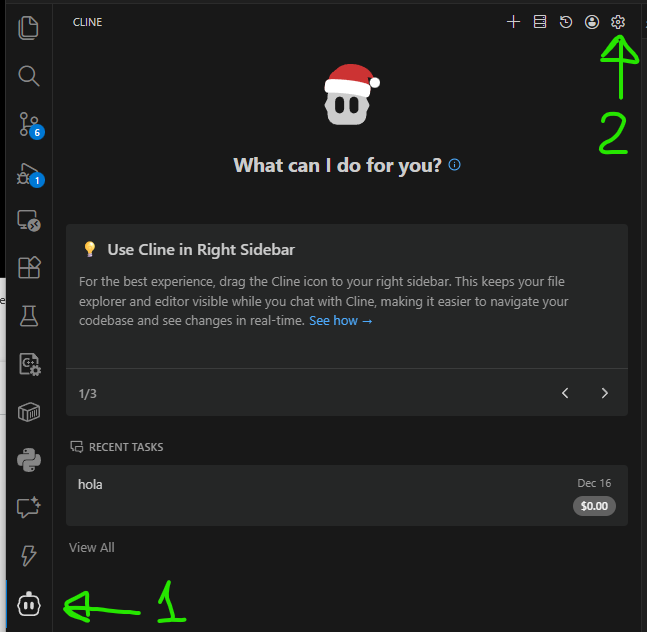
- Navigate to API Configuration
In the settings, find the section for "Providers" or "API Configuration". Select "OpenAI Compatible" as the provider type.Cline / Roo Code / Kilo Provider Configuration
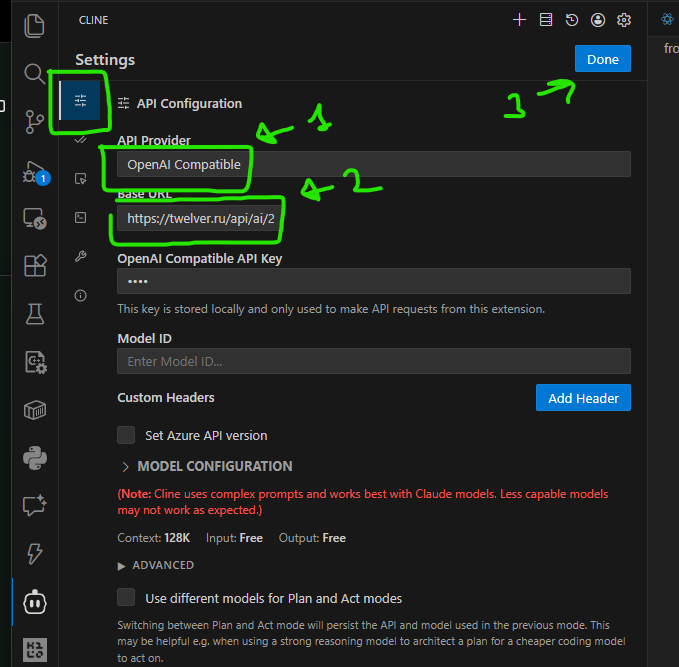
- Enter Connection Details
- Provider: OpenAI Compatible
- Base URL: Copy the Base URL from your AI Integrations page.
- API Key: Enter any value (it's not used for authentication in this setup)
- Model:
auto(the system automatically uses your configured model)
- Save Settings
Click "Save" or "Apply" to save the configuration.
Step 4: Use VS Code Extension
Once configured, the extension will use your Twelver AI quota for code assistance features like:
- Code completion
- Code explanation
- Refactoring suggestions
- Chat-based coding help
Tokens will be deducted from your Twelver account as you use the extension.
Troubleshooting
- Ensure you are registered and logged in on Twelver
- Check that you have sufficient tokens in your account
- Ensure your AI Integration link is active on the AI Integrations page
- Verify the Base URL is copied correctly (including the trailing slash)
Оцените свой опыт